Convert scans to Word, JPG or text
Every scan can leave as a searchable PDF, an editable Word document, a set of JPG images or plain text — through the share sheet, to any app.

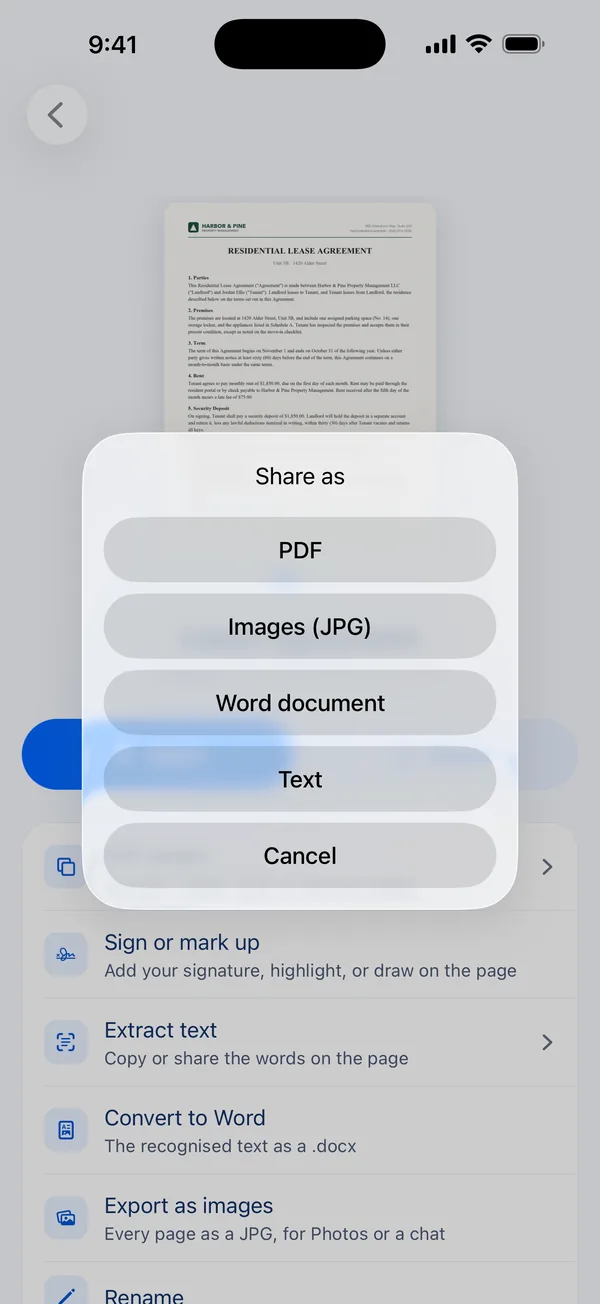
How to do it
- Open a scanned document.
- Tap Share.
- Choose PDF, Images (JPG), Word document or Text.
- Send it to Files, Mail, Messages, AirDrop, Print or any app that accepts the file.
Word: the text, ready to edit
The Word option creates a .docx containing the text recognised on each page, one page of text per page. It is the quickest way to get a printed letter or form into something you can edit and reuse.
It carries the words, not the original layout — columns, tables and images are not rebuilt. When the look of the page matters, send the PDF.
JPG, PDF and plain text
Images (JPG) gives you every page as its own picture, named after the document — handy for a chat or for Photos. PDF keeps the full page with its searchable text layer. Text sends a plain .txt file, or you can copy it straight from the Extract text screen.
Questions
Does the Word export keep my formatting?
It keeps the text and the page breaks. Layout such as columns, tables and images is not reproduced; use the PDF when you need the page exactly as it looked.
Can I open the Word file in Pages or Google Docs?
Yes. It is a standard .docx file that Word, Pages and Google Docs all open.
Is exporting free?
Exporting and sharing are part of Scan Page Pro. Scanning is free.
Get Scan Page
Scanning is free and your documents never leave your device. Scan Page Pro unlocks opening, exporting, signing and sharing what you capture.
More you can do
Copy text from a scan
Copy the text from a printed page on your iPhone. Scan Page recognises text on the device, so you can copy, share or search the words on any scan.
Scan to PDF
Scan paper documents to clean, searchable PDFs on your iPhone. Automatic edge detection, perspective correction and multi-page scanning, with nothing uploaded.
Sign documents
Sign a contract or form on your iPhone: scan it, draw your signature with your finger, place it on the line and share the signed PDF.